Design
AI wizard
Describe a menu board in a sentence and get an editable draft template built from your real data, with every price and name linked to a feed.
The wizard designs a first draft for you. It reads your feeds, picks the fields it needs and lays out a template you can finish in the editor. It can only link to fields that exist in your data, so the draft shows real values.
Generate a draft
- Go to AI Wizard.
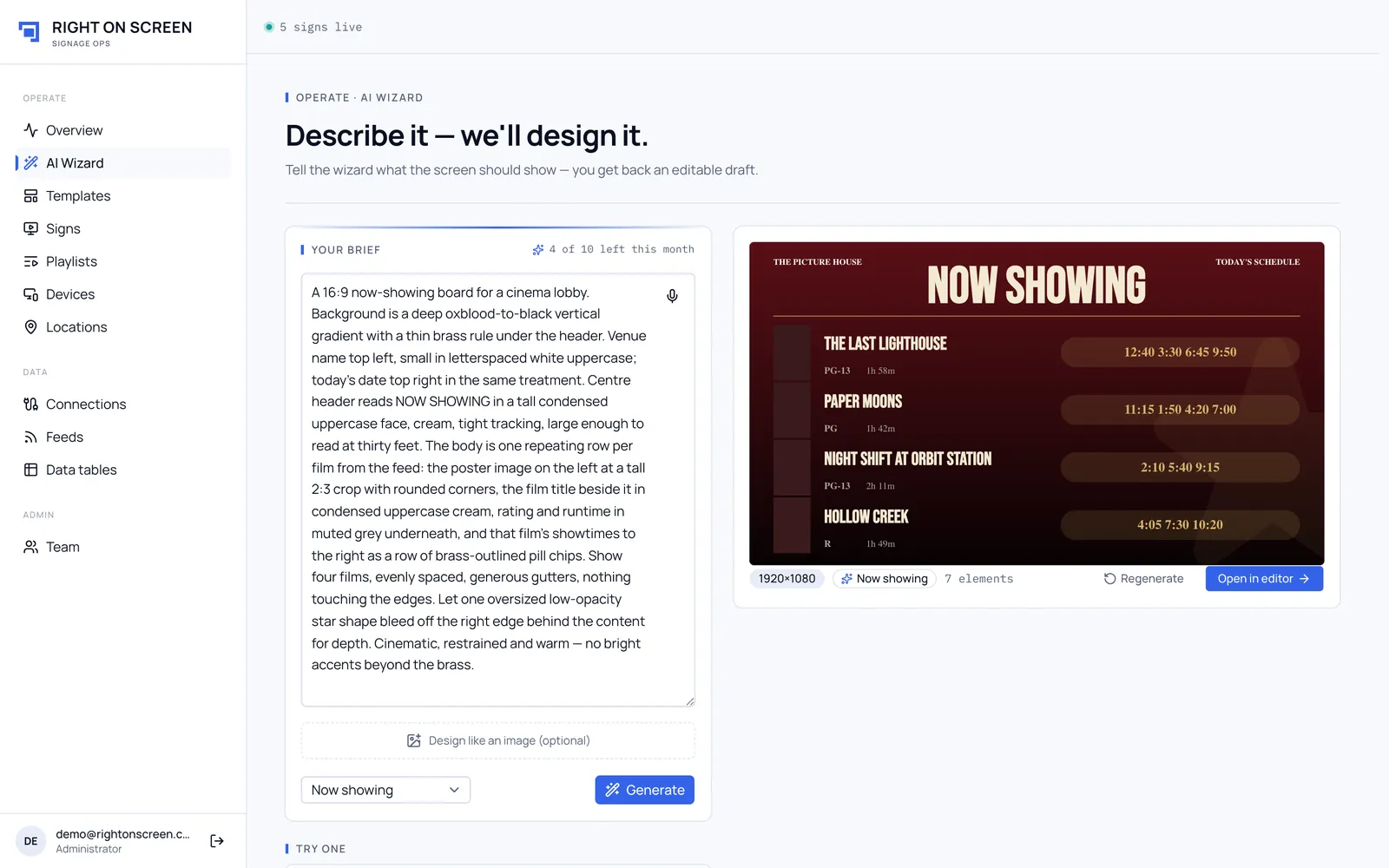
- Under Your brief, describe the board: what it shows, how many columns, the mood. Use Dictate to speak it, or start from one of the Try one examples.
- Choose the feed to use, or Let the AI choose.
- Optional: add an image under Design like an image (optional). The wizard matches its layout and style, but the content still comes from your feed.
- Click Generate. A board usually takes 10–30 seconds.
- Check the preview. Click Regenerate to try again, or Open in editor to finish it.
Tips for a good brief
- Name the data: “the snack menu with prices”.
- Give the layout: “four columns, category headings, prices on the right”.
- Give the look: “dark background, bold condensed headings”.
The wizard can’t draw artwork. Where a design needs a photo it leaves a placeholder for you to fill from Media.
Monthly limit
Your plan includes a number of generations each month. Your brief shows how many are left. When they run out, Generate turns off until the date shown.